SubMagic Review: Captions That Keep Muted Viewers Watching Drama
Most drama clips are watched on mute. A hands-on SubMagic review focused on what matters for short-drama promoters: caption accuracy, style control, and workflow.
Most short drama clips are watched on mute. Autoplay feeds start videos silent, and the viewer decides in about two seconds whether to turn the sound on or scroll past. In that silent window, your captions are not decoration — they are the entire story delivery system. This is the review of SubMagic written from that specific angle: does it keep muted viewers watching drama clips? Short answer after weeks of real use — yes, with a few habits you need to build around it.
What SubMagic actually does
SubMagic is an AI captioning and short-form enhancement tool. Feed it a clip and it produces:
| Feature | What it does for drama clips |
|---------|------------------------------|
| Animated captions | Word-by-word emphasis in creator-style designs — dialogue lands even on mute |
| 48-language support | Generate captions in English from Chinese-language source material |
| Auto emojis and highlights | Emotional beats get visual punctuation without manual keyframing |
| B-roll insertion | Fills flat moments with stock footage automatically |
| Auto-zoom and sound effects | Adds punch to reactions and reveals |
The core pitch — "raw footage to postable short in 60 seconds" — is close to honest. The caption engine is the reason to buy it; the extras are convenience.
Why captions decide drama clip retention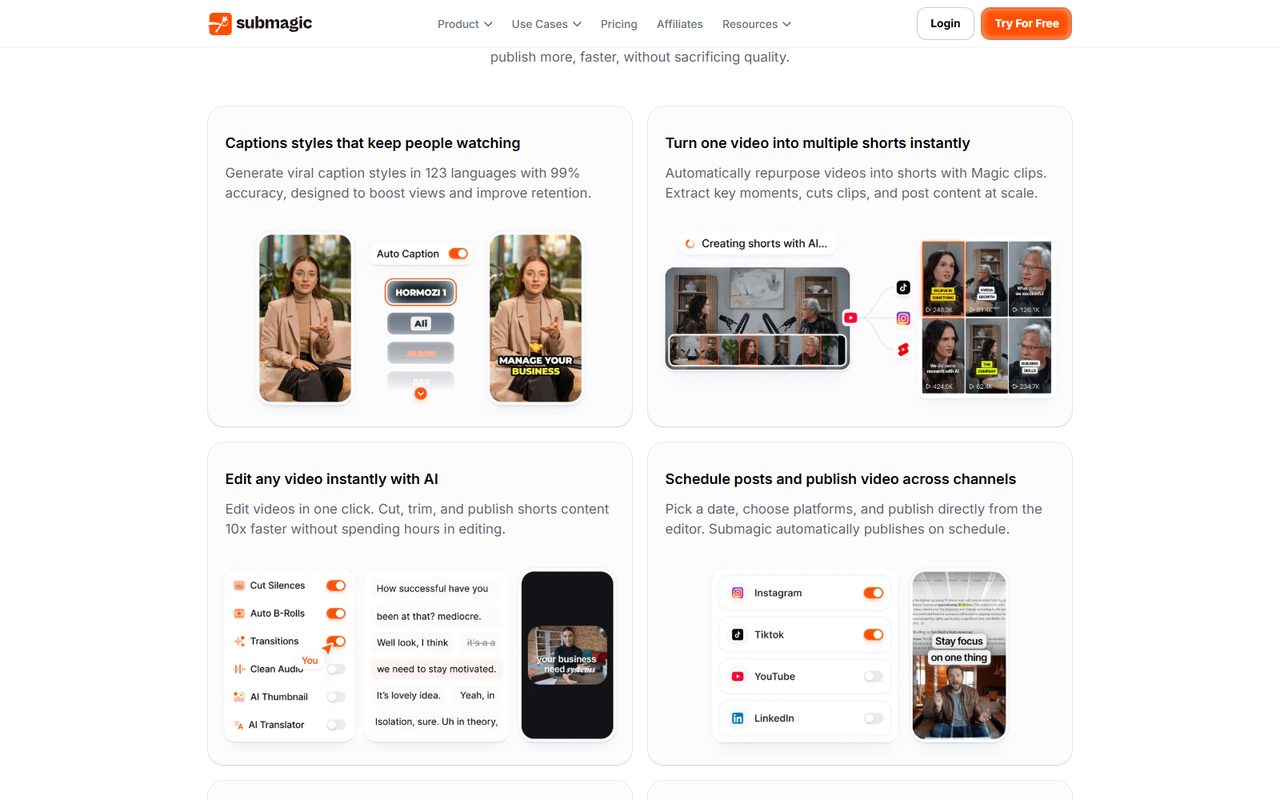
Drama is dialogue-driven. Strip the audio and a drama clip is people staring at each other — the plot lives in the lines. That means a muted viewer needs captions that are readable at feed speed: large enough, timed tightly, and styled so the eye catches the key word. The editing templates handle the cut structure; SubMagic handles the silent-viewing layer. The two together are the reason a clip holds past the three-second mark instead of dying there.
There is a retention chain worth understanding: hook (visual + first caption line) → comprehension (readable dialogue) → suspense (cut before resolution — the hook formulas define that cut). SubMagic strengthens the middle link, which is the one most DIY captions break.
The drama-clip workflow with SubMagic
- Secure rights-cleared footage first. Join through official channels — the invitation code walkthrough is the entry point — and work from authorized assets. No caption tool fixes a copyright strike.
- Rough-cut the clip in your editor of choice, following the cut-before-resolution rule.
- Run it through SubMagic with captions set to English if your audience is English-speaking.
- Review every caption line. Auto-transcription mishears names, honorifics, and genre terms — and in a dialogue-driven niche, one wrong subtitle reads as sloppy, not AI-ish.
- Tame the style. The default template is loud. Dial emoji density down for tense scenes; keep emphasis for betrayal lines and reveals.
- Export, then post per platform — the mobile-only promotion workflow covers the posting side if you run channels from a phone.
Honest pros and cons
| Pros | Cons |
|------|------|
| Captions are genuinely feed-ready out of the box | Default style is too flashy for serious scenes |
| 48-language support is real, not marketing | Translation needs human review for drama dialogue |
| Fast — minutes per clip, not an editing session | Adds cost on top of a clipping tool if you run both |
| Free trial lets you test on your own footage | Monthly subscription adds up across a full tool stack |
That last con deserves a note: SubMagic does one job. If you already use an AI clipper with decent captions, you are paying twice for overlap. The stack that makes sense is a transcript-style clipper plus SubMagic for the caption layer, or a clipper with built-in captions plus SubMagic only when a show needs the premium look. The editing tools roundup maps which combination suits which workflow.
Common Mistakes when auto-captioning drama clips
- Trusting transcription blind. Names and plot-critical words get misheard. One wrong name in a betrayal scene and the comments turn on you.
- Letting captions cover the frame. Drama footage has faces, text overlays, and platform UI zones. Captions belong in the lower third, clear of the original subtitle strip.
- Max style everywhere. Emojis and neon emphasis fit comedic beats, not a funeral scene. Match caption energy to scene energy.
- Ignoring timing drift. After manual cuts, re-run captions. Stale subtitles desynced by half a second read as amateur.
- Captioning ripped episodes. Same rule as every tool review: authorized assets only. The tool is packaging, not a rights solution.
FAQ
Is SubMagic free?
There is a free trial with limited exports — enough to caption several real clips and judge the output. Paid plans are subscription-based; check current pricing on their site before committing.
Does SubMagic translate Chinese audio to English captions?
Yes — transcription and caption translation across 48 languages is one of its core features. Quality is strong for feed use, but review drama dialogue manually; literal translation flattens the melodrama these shows run on.
SubMagic vs built-in captions in CapCut or my clipper?
Built-in caption tools are fine for plain subtitles. SubMagic earns its subscription when you want animated, word-level emphasis styling that matches top-performing creator formats — and when volume makes manual styling uneconomical.
Can I use SubMagic and Opus Clip together?
Yes, and it is a sensible stack: one tool finds and cuts the moment, the other polishes the caption layer. Just avoid paying for overlapping caption features in both.
Will styled captions hurt my reach?
No — platforms reward watch time. The risk is stylistic: wrong-tone captions cost credibility with drama audiences, not algorithmic penalties.
Verdict
For a dialogue-driven, mute-first format like short drama promotion, SubMagic solves the exact problem that kills most clips: unreadable or absent captions in the silent window. It is not a clipping tool and does not pretend to be. Pair it with a rights-cleared cutting workflow, review the transcription, and it quietly becomes the highest-leverage subscription in the stack.
Related reading: Editing Templates · Hook Formulas · AI Dubbing Workflow
Some links in this guide are affiliate links — we may earn a commission at no extra cost to you, and this never affects our verdicts.
This is an independent channel-docking resource. It is not affiliated with or endorsed by ReelShort or any tool reviewed above.
Email partner@shortdramapartner.com for channel-docking consultation and help applying for your ReelShort invitation code through official channels.
Frequently Asked Questions
How do I get started with SubMagic Review?
Email partner@shortdramapartner.com to request your invitation code. We send your personal code and a step-by-step onboarding link within 24-48 hours.
How do I join the ReelShort affiliate program?
Email partner@shortdramapartner.com with your name, your promotion channels (TikTok, YouTube, blog, etc.), and an estimate of your monthly traffic. We reply within 24-48 hours with your personal invitation code and registration link.
Do I need any experience to start?
No. Our free guides walk you through every step - from getting your code to publishing your first promo post - so complete beginners can follow along.
How soon can I earn my first commission?
Most new affiliates see their first conversions within 2-4 weeks of consistent daily promotion.
Want Your Own ReelShort Invitation Code?
You just read how it works — now grab your personal code and start promoting. Enter your email and we'll send it right over.
We'll only use your email to send your invitation code and occasional program updates. No spam.
Recommended Tools
Tools our team actually uses to produce and promote short drama clips.
- Opus ClipTurn long drama episodes into scroll-stopping shorts automatically
- SubMagicAuto-captions, emojis and b-roll for short-form video
- ElevenLabsAI voiceovers — dub Mandarin drama clips into natural English
- VizardTurn long recordings into short social clips with transcripts
- GetResponseEmail marketing to grow your own promo audience
- Systeme.ioFree funnels, email and automation for affiliate beginners
Some links above are affiliate links — we may earn a commission at no extra cost to you. This never affects our rankings or recommendations.
Comments
Comments powered by Giscus will appear here.